



| HEADLINE |

|

Feature Camping Gear in Forest Scenes for Outdoor Marketing



When equipment is advertised in real-life settings, it becomes much easier to understand how it is used outside. Plain backgrounds highlight products but don't often indicate where equipment is. Tents, backpacks, sleeping bags, lanterns, and cooking equipment are all items that are found in the natural setting of a forest. Dreamina is a blend of product references, creative instructions, image generation, and AI video creation. They transform product images into lifestyle images, posters, and clips. Each item is recognizable with clear composition to create an outdoor identity.
Why Forest Settings Make Camping Gear Advertising More Appealing
Woodland environments provide familiar natural details and communicate adventure—an authentic setting with trees, textured ground, and winding trails, where camping equipment is set. A tent looks more real in an open area than in front of a bare studio wall. Product finishes can be enhanced by forest colors, but too much blending decreases visibility. Bright equipment against dull greens and browns, or dark products, require balanced lighting. Dreamina Marketing Studio converts product references and creative directions into advertising images and videos. Forest compositions are used to support storytelling, with equipment at the center. Product ads have a clear purpose for every background detail.
Select a wooded site that will accommodate the purpose of each product, and then frame the product's characteristics.
Tents in woodland clearings: Tents are located in open forest areas with trees providing scale. Do not leave entrances, poles, seams, and exterior material out of view.
Backpacks on forest trails: Place backpacks next to trails or natural areas. Include compartments, straps, buckles, and the whole figure.
Sleeping bags at campsites: Bring sleeping bags to campsites, either in tents or on camping mats. The morning light is soft, giving a peaceful tone.
Lanterns after sunset: Lanterns are placed next to tents or wooden tables. Compare their brightness to darker environments without obscuring information.
Portable cooking equipment: Set up stoves and cookware on stable surfaces within the campsite. Maintain identification of burners, controls, handles, and components.
Outdoor accessories: Place items such as bottles, camping equipment, and folding chairs in woodland scenes. Space is to be provided around each item.
Feature Camping Gear in Forest Scenes with Dreamina Marketing StudioStep 1: Upload Your Camping Gear and Add a Trail PresenterSign up or log in to Dreamina first, so you can start creating forest ads.
Next, open "Marketing Studio" on the left bar to access every camping creation tool.
Choose "AI video" for forest clips, "AI image" for stills, or "AI agent" for both.
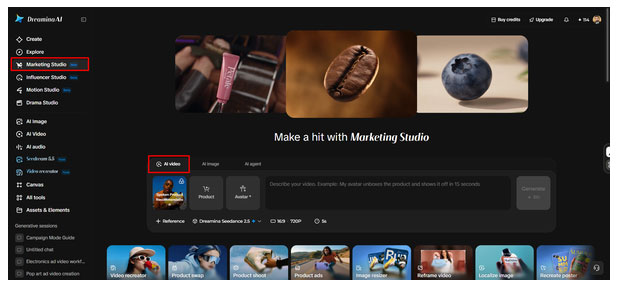
Inside "AI video", select "Change style" to pick the look that suits your woodland scenes.
Click "Product" to upload your tent photo, then click "Avatar" to bring in a hiker presenter.
You can also choose from the library with existing products and avatars if you prefer.
Write a prompt describing misty pines, lantern light, and the mood you want viewers to feel.
Add custom direction freely, such as slow camera pans across your tent at sunrise.
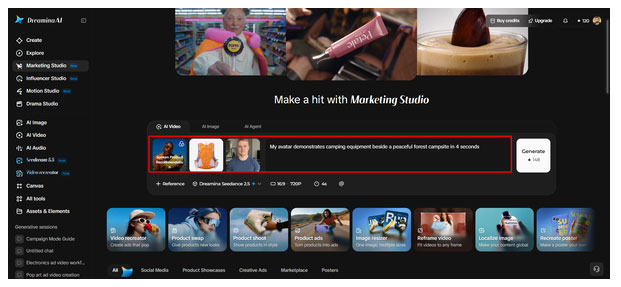
Click the "Reference" tab to add a video that shows the AI your preferred look.
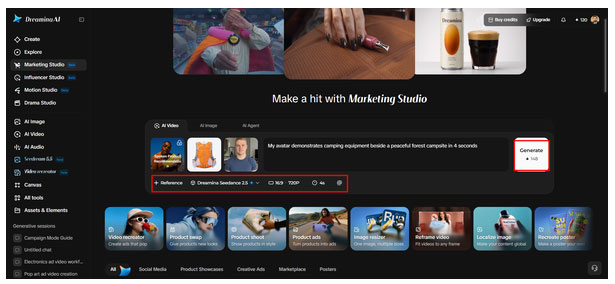
Choose a model such as HappyHorse 1.1, Dreamina Seedance 2.5, Dreamina Seedance 2.0, Dreamina Seedance 2.0 Fast, Dreamina Seedance 2.0 Mini, or Wan 3.0, etc.
Select a custom size from the "Aspect ratio" and "Resolution" tabs for your channel.
Click the "Duration" tab to set a custom length that fits your campfire story.
Use the "@" option to mention or highlight the exact stove or sleeping bag in your video.
Finally, click "Generate" to begin creation and let the AI build your forest scene.
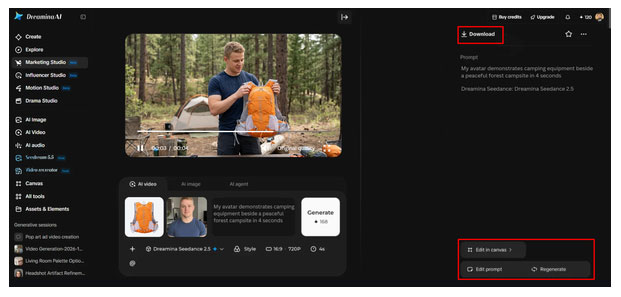
Watch the finished video in full screen and check the gear framing, the presenter's delivery, and the pacing.
If the result misses the mark, use "Edit prompt" or "Regenerate" to refine it.
You can also open "Edit in canvas" to replace the background, add effects, or crop the video.
Once you feel satisfied, click "Download" to save the clip and share it across your marketing channels.
Write Effective Prompts for Realistic Outdoor Product Presentations
A useful clue is a description of the environment and how the product should look. Indicate a pine forest, leafy trail, woodland clearing, or mountain campsite. Specific locations are more useful in composition than general descriptions. Talk about the lighting, using golden-hour sunlight, soft morning light, or balanced evening light. Use wide shots, close-ups, or controlled tracking to define camera perspective. Clear instructions are needed for product accuracy. Describe the original shape, colour, proportions, material, and visible features. If applicable, talk about tent seams, backpack pockets, lantern handles, or stove controls. Include fine detail such as mist, leaves, soil texture, and natural shadows. Always keep effects subtle and not to the point of overpowering the equipment.
Create Consistent Camping Gear Promotions Across Different Marketing Formats
For campaigns, multiple assets for various placements may be necessary. Dreamina's Marketing Studio is used for product images, posters, lifestyle visuals, and advertising videos. Landscape format is ideal for capturing broad vistas of a campground, while portrait format works well for social media content that's more vertical. Instead of cropping all of your assets the same, alter dimensions for each channel. Recycling product references helps maintain the same colors, shapes, and details in different variations. An item can be introduced on a forest poster, and features can be explained through close-up images. It is possible to have a short video display the product at a campsite. Seasonal variations provide flexibility without altering product and identity. Bright clearings in summer, warm foliage in fall, and new greenery in spring may be elements of an overall campaign. For assets to function as a single campaign, they should be consistently referenced.
Improve Visual Quality Without Distracting from the Product
The camping item should continue to be the primary theme in an immersive forest. Display it so that its form and necessary parts are exposed. Do not obscure features with branches, shadows, people, or any other decorative items. Shadows should move in the direction of the light and the surface of the ground in line with the scene. Different materials like nylon, metal, canvas, or plastic react differently to light. Assess proportions, straps, poles, zippers, handles, and controls for changes that are not desired. The movement generated should not be a distortion of products between frames. If it feels like the scene is too crowded, change the prompt or regenerate with simpler backgrounds. Framing, backgrounds, cropping, and effects can be adjusted in the Canvas editing. Try to make sure to compare the outcome to the original product image before posting. Verify that color, logos, parts, and identifying information are correct. Visuals that are inaccurate due to human review can be introduced.
Conclusion
Camping equipment has a context and conveys its purpose in forest environments. Proper framing, lighting, and appropriate woodland elements enhance promotional visuals. References to products and creative directions complement image and video workflows. Reusable references keep presentations consistent, while prompts and reviews improve presentations. Normal camping photos can be turned into immersive outdoor advertising material.


Published by the Editor on behalf of the Observer Ltd. from Globe Printers, 24/A, New Eskaton Road, Ramna, Dhaka.
Editorial, News and Commercial Offices : Aziz Bhaban (2nd floor), 93, Motijheel C/A, Dhaka-1000.
Phone: PABX- 41053001-06; Advertisement: 41053012; 01793317829, 01550707291, 01550707296
E-mail: [email protected], [email protected]. [email protected], [email protected], [email protected], [email protected], Online-email: [email protected]


