



| HEADLINE |

|

How to create your own Bangladesh travel map
Published : Monday, 5 October, 2026 at 4:14 PM
Observer Online Report


Collected Photo
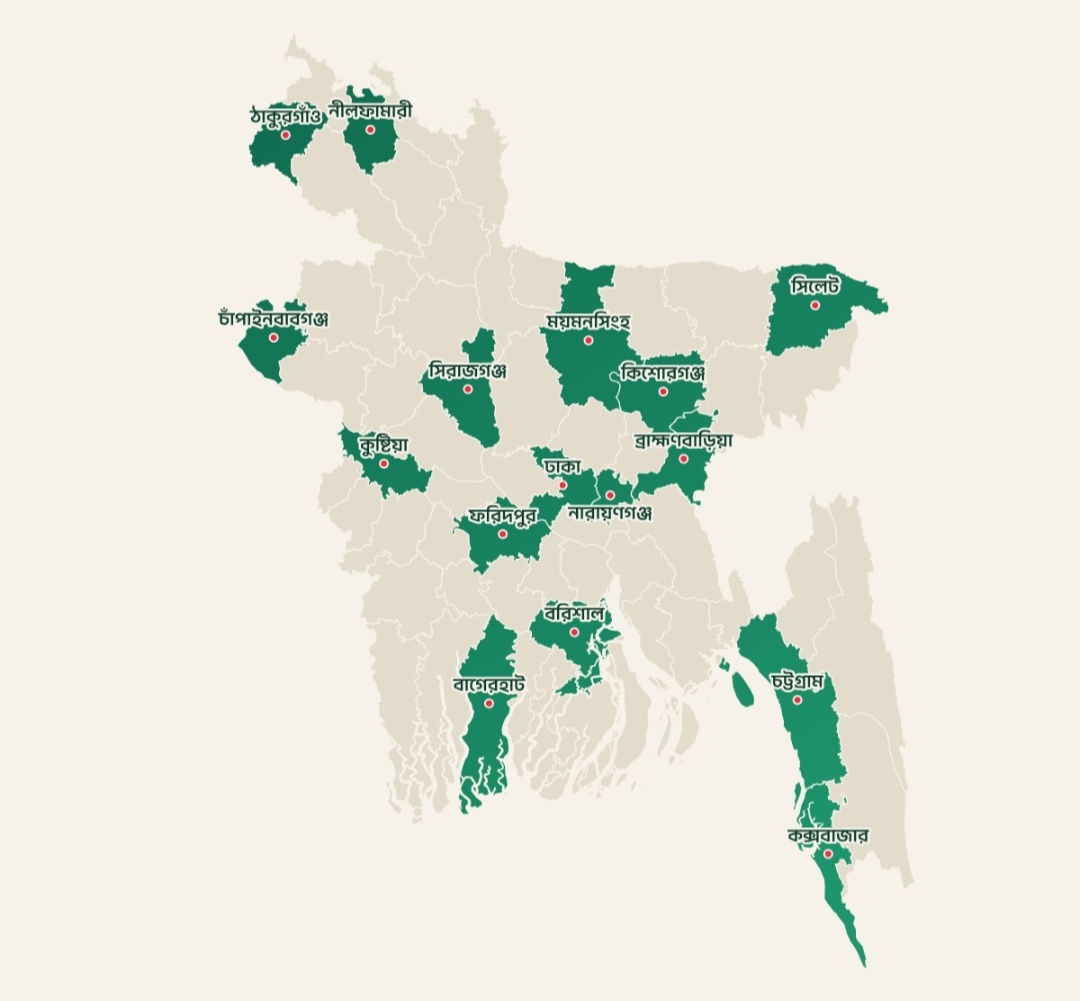
A personalised map showing how many districts people have visited in Bangladesh is gaining popularity on social media, turning travel memories into a shareable digital trend.
The map, created through the Unseen Bangladesh platform by travel enthusiast and designer Md Sabbir Hossain Robin, allows users to mark the districts they have explored from all 64 districts across the country.
The map, created through the Unseen Bangladesh platform by travel enthusiast and designer Md Sabbir Hossain Robin, allows users to mark the districts they have explored from all 64 districts across the country.
To create the map follow the instructions.
The website lists all 64 districts under the country's eight divisions. Users can select districts by clicking their names, clicking directly on the map or searching for a district by name. The number of selected districts is automatically displayed—for example, visiting 10 districts will show 10/64. There are also options to select all districts or clear the selections and start again.
2. Choose a theme
Users can personalise the map by selecting one of five available themes. The selected theme can be previewed before finalising the map.
3. Add your name and photo
The map also allows users to add their name and photograph. Adding a name is optional. If no name is provided, the map displays “Amar Bangladesh.”
4. Download the map
After completing the customisation, scroll down to the download section and download the map in PNG, JPG or PDF format. The finished map can then be shared on social media.
Plan your next trip.

Loading...
Loading...
Also read


Editor : Iqbal Sobhan Chowdhury
Published by the Editor on behalf of the Observer Ltd. from Globe Printers, 24/A, New Eskaton Road, Ramna, Dhaka.
Editorial, News and Commercial Offices : Aziz Bhaban (2nd floor), 93, Motijheel C/A, Dhaka-1000.
Phone: PABX- 41053001-06; Advertisement: 41053012; 01793317829, 01550707291, 01550707296
E-mail: [email protected], [email protected]. [email protected], [email protected], [email protected], [email protected], Online-email: [email protected]
Published by the Editor on behalf of the Observer Ltd. from Globe Printers, 24/A, New Eskaton Road, Ramna, Dhaka.
Editorial, News and Commercial Offices : Aziz Bhaban (2nd floor), 93, Motijheel C/A, Dhaka-1000.
Phone: PABX- 41053001-06; Advertisement: 41053012; 01793317829, 01550707291, 01550707296
E-mail: [email protected], [email protected]. [email protected], [email protected], [email protected], [email protected], Online-email: [email protected]


