



| HEADLINE |

|

6 settings should change to protect FB's data
Published : Tuesday, 18 August, 2026 at 3:51 PM
Observer Online Report


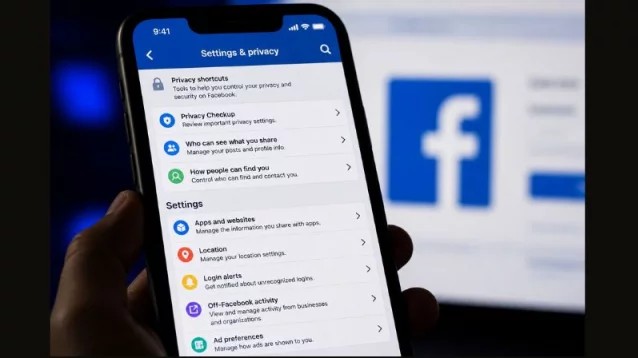
Facebook users may not always know how their personal information is collected, stored or shared with third parties.
Old app and game connections, location permissions, ''Login with Facebook'' services and activity on websites outside Facebook can all create links between users’ data and the platform.
Rather than relying solely on default settings, users should regularly review Facebook’s privacy and security controls.
Here are six settings worth checking to strengthen control over personal information.
Remove unnecessary apps and games: Apps and games connected to a Facebook account may access certain profile information based on the permissions granted by the user. Old, unused or unfamiliar connections should be removed.
Go to Settings and Privacy - Settings - Apps and Websites to review connected apps and games. Removing unnecessary connections can reduce the number of third-party services with access to your information.
Turn on login alerts: Login alerts can help users identify access to their accounts from unfamiliar devices. Depending on the settings, Facebook may send notifications or emails when a suspicious login is detected.
The feature can be accessed through Accounts Center - Password and Security - Login Alerts. If an unfamiliar login is detected, users can quickly change their password and take other security measures.
Disconnect services where “Login with Facebook” is no longer needed: Using “Login with Facebook” makes it easier to access third-party websites and apps, but it also links those services to a Facebook account.
Users can review connected services under Settings and Privacy - Settings - Apps and Websites and remove apps, websites or games that are no longer needed.
Run a regular Privacy Checkup: Facebook’s Privacy Checkup allows users to review several privacy controls in one place. These include who can see their posts, what profile information is visible to others, how contact information is used and certain advertising preferences.
Go to Settings and Privacy - Settings - Privacy Checkup and review each option. Regular checks can help identify outdated or unwanted privacy settings.
Restrict location access: If Facebook has permission to access a device’s location, the app may be able to access location-related information. Users can limit this permission through their phone’s settings according to their needs.
The exact options vary depending on the device and operating system, but commonly include choices such as Never or While Using the App. Users can also review their Facebook activity for older location-related posts and check-ins.
Review ad tracking and off-Meta activity: Online activity on websites and apps outside Facebook may be used to personalise advertisements. Users can review related controls under Accounts Center - Ad Preferences.
Facebook also provides an Off-Meta Activity section under Your Information and Permissions, where users can review information about activity associated with them outside Meta’s platforms. Depending on the available controls, users may be able to clear previous activity and manage how future information is used.
Changing these settings will not stop Facebook advertisements altogether. Instead, the controls are intended to give users greater control over how their information is used for advertising personalisation and to limit, where possible, the collection of information from activity outside Meta’s platforms.
Facebook regularly changes the names and locations of its privacy controls. Users should therefore check the current options available in their own accounts before making changes.
Old app and game connections, location permissions, ''Login with Facebook'' services and activity on websites outside Facebook can all create links between users’ data and the platform.
Rather than relying solely on default settings, users should regularly review Facebook’s privacy and security controls.
Here are six settings worth checking to strengthen control over personal information.
Remove unnecessary apps and games: Apps and games connected to a Facebook account may access certain profile information based on the permissions granted by the user. Old, unused or unfamiliar connections should be removed.
Go to Settings and Privacy - Settings - Apps and Websites to review connected apps and games. Removing unnecessary connections can reduce the number of third-party services with access to your information.
Turn on login alerts: Login alerts can help users identify access to their accounts from unfamiliar devices. Depending on the settings, Facebook may send notifications or emails when a suspicious login is detected.
The feature can be accessed through Accounts Center - Password and Security - Login Alerts. If an unfamiliar login is detected, users can quickly change their password and take other security measures.
Disconnect services where “Login with Facebook” is no longer needed: Using “Login with Facebook” makes it easier to access third-party websites and apps, but it also links those services to a Facebook account.
Users can review connected services under Settings and Privacy - Settings - Apps and Websites and remove apps, websites or games that are no longer needed.
Run a regular Privacy Checkup: Facebook’s Privacy Checkup allows users to review several privacy controls in one place. These include who can see their posts, what profile information is visible to others, how contact information is used and certain advertising preferences.
Go to Settings and Privacy - Settings - Privacy Checkup and review each option. Regular checks can help identify outdated or unwanted privacy settings.
Restrict location access: If Facebook has permission to access a device’s location, the app may be able to access location-related information. Users can limit this permission through their phone’s settings according to their needs.
The exact options vary depending on the device and operating system, but commonly include choices such as Never or While Using the App. Users can also review their Facebook activity for older location-related posts and check-ins.
Review ad tracking and off-Meta activity: Online activity on websites and apps outside Facebook may be used to personalise advertisements. Users can review related controls under Accounts Center - Ad Preferences.
Facebook also provides an Off-Meta Activity section under Your Information and Permissions, where users can review information about activity associated with them outside Meta’s platforms. Depending on the available controls, users may be able to clear previous activity and manage how future information is used.
Changing these settings will not stop Facebook advertisements altogether. Instead, the controls are intended to give users greater control over how their information is used for advertising personalisation and to limit, where possible, the collection of information from activity outside Meta’s platforms.
Facebook regularly changes the names and locations of its privacy controls. Users should therefore check the current options available in their own accounts before making changes.
Loading...
Loading...
Also read









Editor : Iqbal Sobhan Chowdhury
Published by the Editor on behalf of the Observer Ltd. from Globe Printers, 24/A, New Eskaton Road, Ramna, Dhaka.
Editorial, News and Commercial Offices : Aziz Bhaban (2nd floor), 93, Motijheel C/A, Dhaka-1000.
Phone: PABX- 41053001-06; Advertisement: 41053012; 01793317829, 01550707291, E-mail: [email protected], [email protected] Online: email: [email protected] 41053014; 01550707297 Advertisement: 01550707296
Published by the Editor on behalf of the Observer Ltd. from Globe Printers, 24/A, New Eskaton Road, Ramna, Dhaka.
Editorial, News and Commercial Offices : Aziz Bhaban (2nd floor), 93, Motijheel C/A, Dhaka-1000.
Phone: PABX- 41053001-06; Advertisement: 41053012; 01793317829, 01550707291, E-mail: [email protected], [email protected] Online: email: [email protected] 41053014; 01550707297 Advertisement: 01550707296


